Pest Control3 templatesAgents · Apps · Knowledge

Get next week’s pest control visits in order

See who’s visiting each site and what they need to know before they arrive. Start with the Field service app, then set up reminders and repeat bookings around your team’s rules.

The week, with each visit accounted for

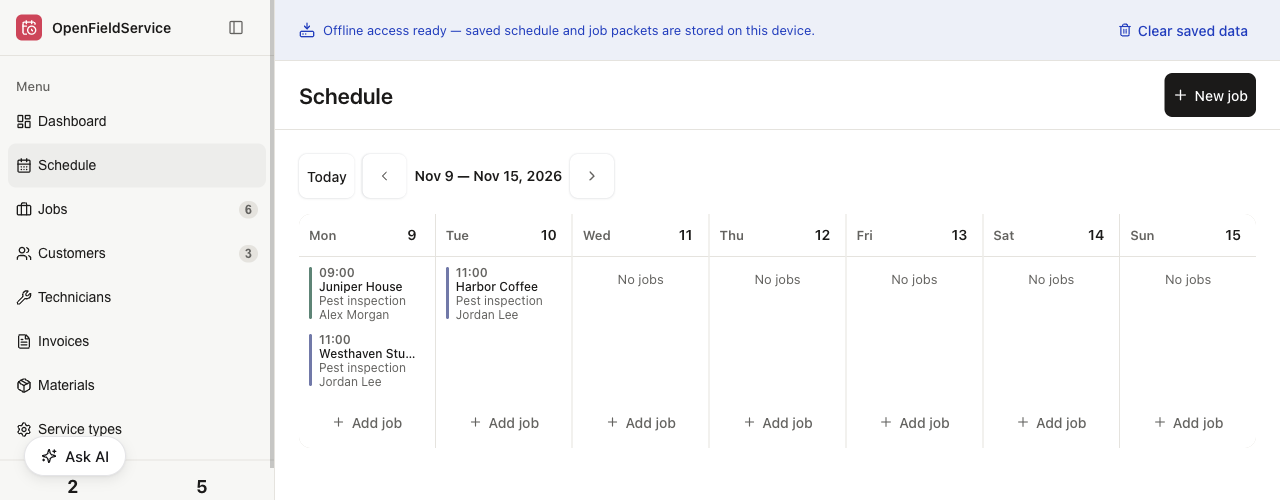
Open the calendar to see the visit time, service and assigned technician. We used the Field service app to book the fictional inspections shown below.

Weekly calendar with two pest inspections on Monday and Harbor Coffee assigned to Jordan Lee on Tuesday at 11:00.
Three visits entered by hand, using fictional sites and staff. In our test, we moved Harbor Coffee’s visit from Monday to Tuesday and assigned it to Jordan Lee. Select the image to view it full size.

Get the booking down

Choose a date and technician, then add the site instructions. A note about access belongs with the job, where the person attending can find it.

A callback needs a booking too

Create another job for the follow-up and give it a priority. The original visit stays in the customer’s history, ready for whoever goes back.

Leave something useful for the next technician

What happened last time? Keep the notes, checklist and materials used with the visit so the next person can read them before arriving.

Decide how repeat visits should work

Choose who approves the next visit and when a reminder should go out. Those automations need their own setup; installing the app doesn’t switch them on. The agent panel above shows an example.

How to run pest control on Clawnify

  1. Pick a manageable round

    Take a few sites with known visit dates, access instructions and assigned technicians.

  2. Put it through a working day

    Book the visits and see whether the calendar and job records give the office what it needs.

  3. Add one automation

    Start with a reminder or repeat booking, agree the rules and test it before using it with customers.

Questions we get asked

Can I use this for recurring pest control visits?

Yes, by booking each visit in the Field service app. A finished job won’t automatically create next month’s or next quarter’s appointment. For that, you’ll need an agent or flow set up with the interval, an approver and a way to catch missed bookings.

Does it optimise pest control routes?

The calendar shows visits and technician assignments. It doesn’t calculate routes, account for live traffic or match jobs to licences. Check travel time and site access yourself, or have an additional workflow set up and tested before using it for dispatch.

Can an agent send appointment reminders?

Yes, once the channel and sending rules are set up. Decide what the message says, when it goes out, who can approve it and where replies go. The Field service app won’t start messaging customers when you install it.

What happens when a customer needs a callback?

Book a separate job and choose its priority and technician. The previous visit stays in the customer’s history. If you move an appointment, also check who needs telling and whether another calendar needs updating; those connections need to be set up separately.

Can technicians use it on a phone or without a signal?

Saved schedules and job packets can be read offline on a device that has already loaded them. You need a connection to make changes; offline edits aren’t queued for later. Try it on your technicians’ phones and at a site with poor reception before relying on it during a round.

Can we keep our current pest control software?

First decide where each record belongs: customers, appointments, contracts and visit notes. Then check the connection or import options for the tools you actually use. There isn’t a ready-made connection to every pest control system, so establish what will work before moving records.

Does the app produce a compliant treatment report?

The app stores the notes, checklists and materials used on a job. Turning those into a customer report needs your report format and someone to check it. Your qualified staff still need to confirm the treatment details, required records and any local reporting requirements.

How much does it cost to get started?

Use the pricing link on this page to see current plans. Work out which apps, agent tasks and communication channels you need first. A workflow illustrated here doesn’t mean a bespoke implementation is included in a particular plan.

Ready to deploy

3 ready

Hire your scheduling assistant

See whether it holds up on your own jobs.