
Put the notes where the next person will look
This fictional inspection shows the customer, technician and site notes on one job. The Field service app also lets you add checklist items and materials used.
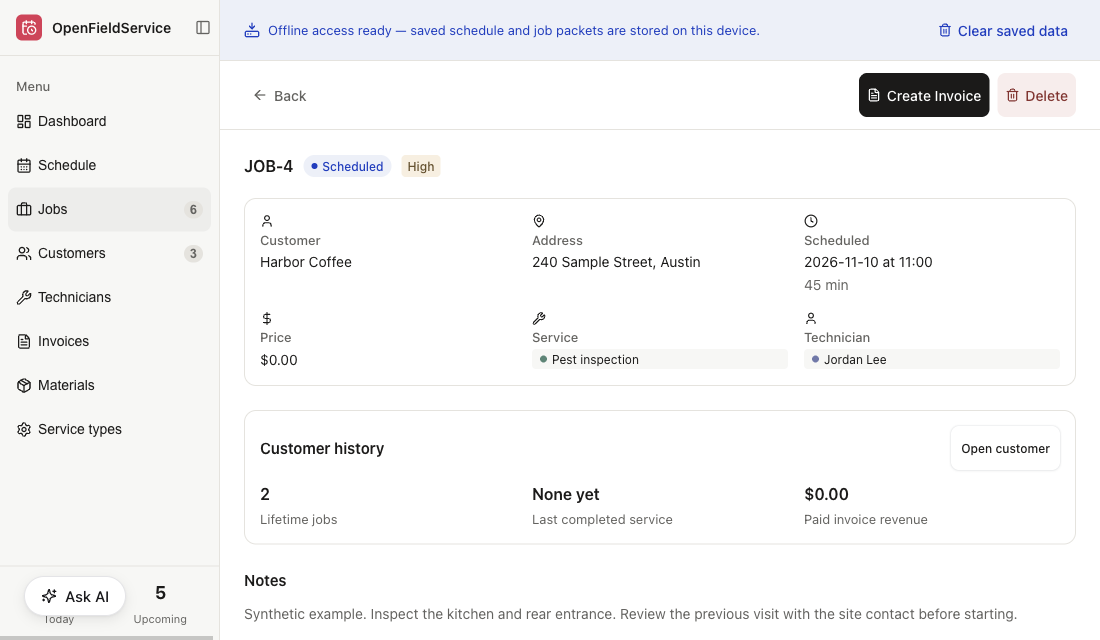
Put the findings, checklist and materials used on the job record. With those details in place, you can prepare a customer report in your own format and have the technician check it.
Prepare a report draft from this visit record
Example setup: use the team’s report format, retain recorded facts and flag missing information for the technician. Read Job Notes 1The draft is ready for review. Please check the findings and fill the missing fields before sharing it.
Draft Visit Report 1
Fictional site instructions for a configured workflow
Use the technician’s recorded findings and the team’s required report fields.
Flag anything missing; do not infer a treatment or result from a generic checklist.
A qualified person checks the report and approves the version to share.
drag to rotate · click a doc to trace its links · double-click to open
This fictional inspection shows the customer, technician and site notes on one job. The Field service app also lets you add checklist items and materials used.
If the record doesn’t say what happened, go back to the technician. A report draft should flag the gap instead of guessing a finding or treatment.
Report drafting needs your format, required fields and an approver. Set up sending separately and test it too; saving notes on a job won’t generate or email a report.
Save the findings, checklist results and materials against the visit.
Have the technician fill any gaps before the customer report is prepared.
Check the draft against the visit record, then share it through the channel you’ve set up.
Notes, checklist items and materials used go on the job, alongside the customer, service and technician. Open the customer’s history when you need to find an earlier visit.
No. Saving a job gives you the visit record. To produce a report, you’ll need your format and required fields set up; to send it, you’ll need a connected channel and permission. Try the whole process with a sample record before sending customer reports.
It should ask. Set the drafting rules so missing facts come back to the technician or reviewer. Findings, treatments and outcomes must come from the record, not from an agent’s guess.
A tick shows that an item on your checklist was marked complete. Your qualified staff still need to decide whether the checklist covers the work and local requirements. Neither a completed checklist nor an AI draft certifies compliance.
More for Pest Control
2 ready
We use cookies to enhance your user experience.
For a complete overview of all cookies used, please see our Cookie Policy.
Customize cookies
Choose which cookies you allow. Essential cookies cannot be disabled.