
Claude blocked the web page ChatGPT loaded through MCP Apps
ChatGPT and Claude both show interfaces through MCP Apps, and each decides for itself whether a page from your own site may load in one. When we ran one test server in both on 20 November 2026, ChatGPT framed our page and kept a session inside it in Chrome but not in its iPhone app, and Claude left the page out.
Connect Clawnify
One standard behind the interfaces in ChatGPT and Claude
MCP Apps lets an MCP server send back an interface with its answer, a small web page the assistant shows inside the conversation. It's an open standard, an official extension to the Model Context Protocol published as SEP-1865 and marked stable on 26 January 2026. ChatGPT's documentation calls the result a plugin with UI. On Claude's connector directory it's an interactive connector.
The mechanics fit in four lines.
- A tool on your server names a page, an HTML document at a
ui://address. - The host fetches that page and renders it in a sandboxed iframe on an origin of its own. The spec calls the page a view.
- View and host talk over
postMessage. The view can call your server's tools, ask for fullscreen, open a link in the browser and send a message into the chat. - A tool can be marked app-only. The view can call it, and the host has to keep it out of the model's tool list.
Both big assistants implement it. OpenAI's page on adding UI says ChatGPT implements the open MCP Apps standard, and the project's README lists ChatGPT, Claude, VS Code, Goose and Postman among its clients. In our test one server answered ChatGPT and Claude alike.
The standard doesn't settle what a page may do once it's there. The sandbox has to allow scripts and same-origin access, and the spec stops at those two. Forms, dialogs, pop-ups and downloads aren't mentioned. A page from another site, your own app for instance, loads inside the view only if the resource declares its origin, and a host "MAY further restrict but MUST NOT allow undeclared domains". So whether the app you already built can open inside the chat is each host's call.
We had a reason to ask. We build and host business apps, and people already read and update their apps' data from ChatGPT and Claude through our connector. We wanted to know if the app itself could open there, so on 20 November 2026 we ran one test server in both.
The same test server gave opposite answers in the two hosts
The test server has three tools and one view. The view asks an app-only tool for a single-use ticket, frames a test page served from the server's own domain, and hands that page the ticket. The page then tries what an ordinary web app does all day. It submits a form, exchanges the ticket for a session cookie, opens a confirm dialog, a pop-up, a new-tab link and a download, and copies text to the clipboard.
We added it to Claude as a custom connector and to ChatGPT as a custom MCP server from its Plugins page, with no sign-in on either, and asked each assistant to open it. The browser was Chrome 157 on a Mac. Later the same day we ran it again in the ChatGPT and Claude apps on an iPhone, signed in to the same accounts.
| Check | ChatGPT, Chrome | ChatGPT, iPhone app | Claude, both |
|---|---|---|---|
| The view renders | yes | yes | yes |
| Our page loads inside the view | yes | yes | blocked |
| A form submits in our page | yes | yes | never loaded |
| Sign-in ticket | exchanged, reuse refused | exchanged, reuse refused | issued, nowhere to send it |
| Session cookie comes back | yes | no cookie at all | never loaded |
| Confirm dialog | none, returns false | none, returns false | never loaded |
| Pop-up | nothing opens | nothing opens | never loaded |
| New-tab link | nothing opens | nothing opens | never loaded |
| Download link | nothing saved | nothing happens | never loaded |
| Copy to clipboard | refused | worked | never loaded |
| Fullscreen | yes | yes | yes |
| Link out | opens a tab at once | asks, then an in-app browser | asks, then opens |
Read the ChatGPT columns with their limits in mind. This is one account per host, on connectors nobody has reviewed, and a plugin that's been through OpenAI's review may get a different sandbox than one added by hand. We haven't run Safari on a Mac yet. Claude answered the same on the iPhone as in Chrome, except that its link out hands the page to Safari.
Claude left our page out and said why in the console
In Claude the view opened, ran its own checks and got its ticket. Where our page should have been, Chrome drew its blocked-page icon.
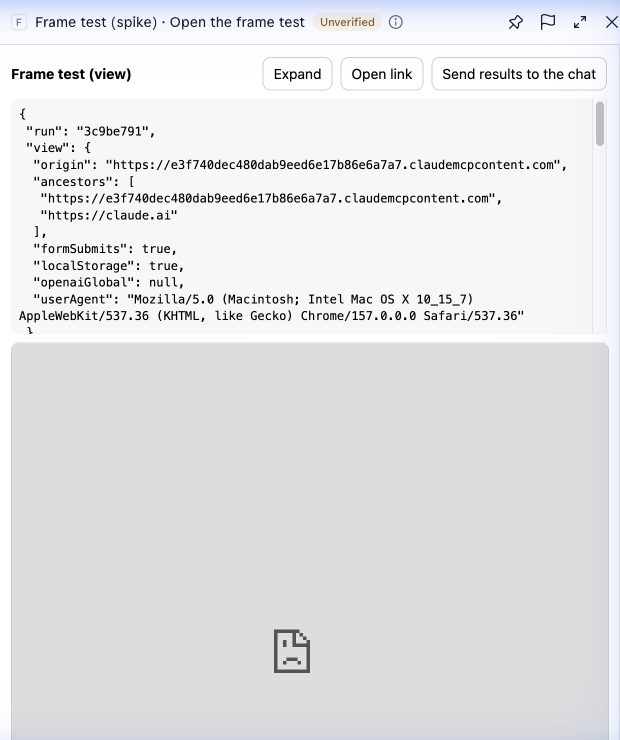
Our test view in Claude on 20 November 2026. The grey area is where the framed page should have loaded.
The reason was in the browser console, written by Claude's own host code:
Not among the sites that Claude allows this connector to show: [our server's address]. Declare only sites the connector is allowed to show; for a connector in the Claude directory, ask for the site to be added to its listing.
The address it refused was the MCP server's own. In Claude, serving the page from the same domain as the server buys you nothing. Anthropic's embedded sites page sets the rule by the kind of connector, in these words.
| Connector | Can its view show your site |
|---|---|
| Directory, Verified listing | "Only when the listing allows the site's origin" |
| Directory, Community listing | "Claude blocks the origin" |
| Custom connector | "Only after the user allows the origin in a conversation" |
| Local server | "Claude blocks the origin" |
The custom connector row carries a condition, in the page's words: "Available to a limited set of organizations, and not in every conversation." Claude never asked us to allow the origin, and the view opened without the site, which is the outcome the page describes where embedded sites aren't available to an account.
A view doesn't have to find this out by failing. When it starts, the host tells it what it was granted, and the spec has a field for it, described as "CSP domains approved by the host". Claude reported an empty list of frame domains. ChatGPT's had our origin on it. So one view can serve both hosts. It frames the app when your origin is on the list and shows a button that opens the app in a browser tab when it isn't. All four hosts we tried, ChatGPT and Claude in Chrome and on the iPhone, said at start-up that they can open links, which is all the button needs. If we were shipping this tomorrow we'd build the button first, because it's the one path that worked in both.
Reading that list takes one more step when a view frames more than one site. A view that opens many apps, each on its own subdomain, can't name them all in advance, so it declares a wildcard. We ran the test again in ChatGPT with a pattern covering every subdomain of the test server's domain in place of its exact address. Our page loaded, and the list the host sent back held the pattern, not the address it had matched. So the view has to match the pattern itself before it decides to frame.
In ChatGPT our page loaded with dialogs, pop-ups and downloads switched off
OpenAI allows what Claude refused. Its page on adding UI says plugins with UI can embed pages "from their MCP server's own registrable domain, including full existing editors and admin interfaces". It also asks for a written justification when you submit, and warns that "Iframe use can require additional review or escalation". Our page loaded on the first try, and a form in it submitted from script and from a real click.
The OpenAI pages we read, the one on adding UI and the plugin reference, don't state the sandbox around the view. We read it off the page:
sandbox="allow-scripts allow-same-origin allow-forms"
A page framed inside the view inherits that sandbox, so it gets those three permissions and no others. Everything that failed in our page follows from what's missing.
| Your app does | What happened | What to use |
|---|---|---|
confirm() | no dialog, false in 0 ms | a dialog built into the page |
window.open | returned null | the host's open-link request |
| A new-tab link | nothing opened | the host's open-link request |
| A download link | nothing saved | a link out to a browser tab |
| Copy to clipboard | refused in Chrome, see below | text the person can select |
| A form | submitted | nothing to change |
The copy result needs a caveat. Our Chrome tab was in the background while the test ran, and that alone can make Chrome refuse a clipboard write. In the ChatGPT iPhone app, with the page in front, the same copy worked, so the refusal was probably the background tab and not the host.
Most of these fail where someone will notice. A button that should open a tab opens nothing. The quiet one is confirm(), which came back false at once with no dialog on screen, so a delete button behind an "Are you sure?" check does nothing and reports nothing. We searched our own open-source app templates the same day. Of 55, 16 call the browser's confirm() for guards like "Delete this board?", and 36 open a pop-up, a new tab or a download somewhere.
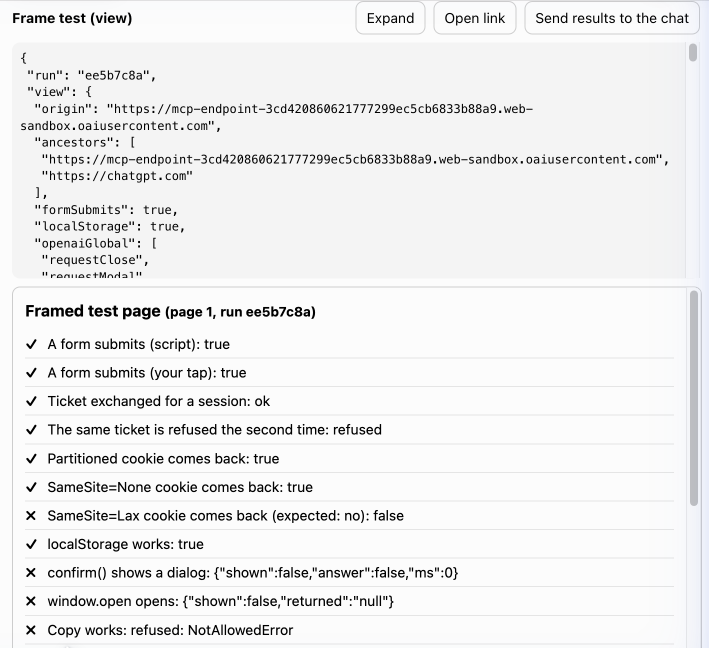
The framed test page inside ChatGPT on 20 November 2026, after we pressed its buttons.
Anthropic documents the same losses for sites embedded in Claude. Its embedded sites page says pop-ups and new-tab links don't open and a link to a file doesn't download. It says "confirm() returns false. Build dialogs into the page", and that a site can still "submit forms to its own origin". What we measured in ChatGPT matches that list line for line.
Sign-in inside the frame took a single-use ticket and a partitioned cookie
Neither host hands a framed page a session. The person signed in to your connector a minute ago, and the app inside the frame still has no idea who they are. Anthropic's page is blunt about it: "Claude passes no session to the site, and a call to document.requestStorageAccess() is rejected." The same page describes a handoff that gets around this, and nothing in the handoff is specific to Claude. We ran it in ChatGPT, with a ticket good for 60 seconds.
| # | What happens | What we saw |
|---|---|---|
| 1 | An app-only tool returns a single-use ticket | Claude lists it apart, as an app-only tool |
| 2 | The view calls that tool | no approval prompt in either host |
| 3 | The view posts it to the frame, at the app's exact origin | Claude had no frame to post to |
| 4 | The page exchanges the ticket for its own session | a second exchange was refused |
| 5 | The cookie is SameSite=None; Secure; Partitioned | it came back on requests and on a page change |
Step 1 rests on an assumption worth checking: that the ticket is minted for the person who connected. So we put the test server behind a sign-in of its own, connected it to ChatGPT and to Claude, and logged which sign-in every call carried. Both hosts found the sign-in by themselves and registered as clients. In both, the view's calls to the app-only tools arrived with the same token as the model's call that opened the view, sent from the host's own servers with the same user agent. Your server can't tell a call from the view and a call from the model apart. Keeping an app-only tool away from the model is the host's promise, not something the server can check, so the ticket has to be harmless if the model ever sees one: single use, gone in a minute, tied to one person and one app, and accepted only by that app's own page.
Two smaller things showed up in the same run. In Claude the view asked for its ticket before the model's call that opened it had been answered, so a view starts while that call is still in flight and can't count on its result arriving first. And Claude files any tool that has a view under a heading of its own, interactive tools, which on our account were set to ask before each run. Our test tool was marked read-only, and Claude still asked.
We set three cookies to see which would survive. The partitioned one came back, and so did a plain SameSite=None cookie. A SameSite=Lax cookie didn't, and Lax is what Chrome assumes when an app doesn't say. An app that keeps its session that way works in its own tab and arrives in the frame signed out.
Our Chrome profile allows third-party cookies, so this was the easy case. The ChatGPT iPhone app was the hard one. The page loaded, the form submitted and the ticket exchange worked, and then no cookie came back at all, partitioned or not, on a request or on a page change. Inside the frame the browser reported cookies as switched off, while local storage still worked. So a cookie session can't hold in that frame.
That makes a check part of the design. The page has to look for its own cookie after the exchange and, when it isn't there, tell the view, which then offers a link out instead. On a phone that's the normal path, and the link isn't the same in both apps. ChatGPT asks first and opens its own in-app browser, which keeps cookies apart from Safari, so the person signs in there once. Claude asks first and hands the link to Safari.
One result surprised us. We opened the test a second time, in a new conversation and under a different view origin, and the page arrived already carrying the first run's cookies. A partitioned cookie is keyed to the site in the address bar, which is chatgpt.com every time, and the conversation isn't part of the key. If you build this, exchange a fresh ticket every time the app opens and replace whatever session is there. The cookie you find may belong to the last person who used ChatGPT in that browser.
Last, your app has to agree to be framed. If it sends a frame-ancestors policy, and an app with signed-in pages should, the browser checks that policy against every frame above the page. In ChatGPT ours saw the view's origin twice and then chatgpt.com, or skybridge.oaistatic.com in the iPhone app, so a policy for ChatGPT has to allow both. That origin was a host under web-sandbox.oaiusercontent.com, and when we asked for a domain it became our own host name with dashes in place of dots. The standard field, _meta.ui.domain, is enough for that. A later run set only that field, without ChatGPT's own openai/widgetDomain key, and got the same host. Claude runs views on a host under claudemcpcontent.com, and its getting-started page gives the formula: the first 32 hex characters of the SHA-256 of your server URL. Claude used that exact host when we set it and a different one when we didn't.
So set the view's domain on both hosts and the list your app has to allow stays fixed. OpenAI requires one anyway when you submit a plugin with UI. And name the exact host in your policy. Anthropic warns that with a wildcard over claudemcpcontent.com, "the MCP Apps of other connectors can frame your site".
We shipped the button first, then gave the framed app its dialogs back
We built it the same day, in the order the test pointed to. One tool opens any app in a workspace, and one view serves every host. The view reads the frame domains the host granted, matches them against the wildcard it declared, and frames the app only when the pattern is on the list. Otherwise it shows a card with the app's name and a button that opens it in Clawnify.
Claude showed the card, in Chrome and on the iPhone. So did the ChatGPT iPhone app, where the button asks first and then opens ChatGPT's in-app browser. ChatGPT in Chrome showed the app itself: our content manager, signed in through the ticket handoff above, reading its own data inside the frame. Its expand control moved the view to a full-height panel beside the conversation.
That left the sandbox. Adapting each app to one host's frame would have meant changing the 55 templates and every app built from them. So the edge in front of our apps adds one small script instead, and only to pages opened through the frame's entry. In their own tab the apps never load it.
| Your app does | The script, in the frame | What we saw in ChatGPT |
|---|---|---|
confirm() | draws a dialog inside the page, replays the click on OK | the dialog appeared, Cancel kept the post |
window.open, a new-tab link | asks the view, which sends the host's open-link request | a browser tab opened at once |
| A download link | fetches the file, hands it to the host's download request | not run yet |
| Copy to clipboard | falls back to the older copy command | not run yet |
The first version of that dialog had two flaws worth knowing if you draw your own. The click on Cancel went on to the app underneath, which read it as a click outside its editor and closed the editor. And a second confirm() stacked a second dialog on the first. A dialog drawn over someone else's page has to keep its own clicks to itself, and show one at a time.
Two things cost us time that we didn't find in the documentation we read. ChatGPT kept a connector's tool definitions until we pressed Refresh tools in its settings, so a new view address went unnoticed until then. And after the refresh it kept serving its stored copy of the view's HTML under the same ui:// address, so a fix to the view did nothing until the address changed. Put a version in the view's address, and change it with every change to the view.
Where that leaves it, on 20 November 2026: people using our connector in Claude get the card now. For ChatGPT, new tools reach the people using our published plugin only once OpenAI has checked them, and we sent the version that describes them for review the same day.