
AI video analysis now watches the footage nobody had time for
Google's newest Gemini models move through a video like an analyst, pulling frames, audio or transcript only where the question needs them. That makes ad libraries, calls and raw footage cheap enough to study, as long as you keep the evidence.
Build your internal tool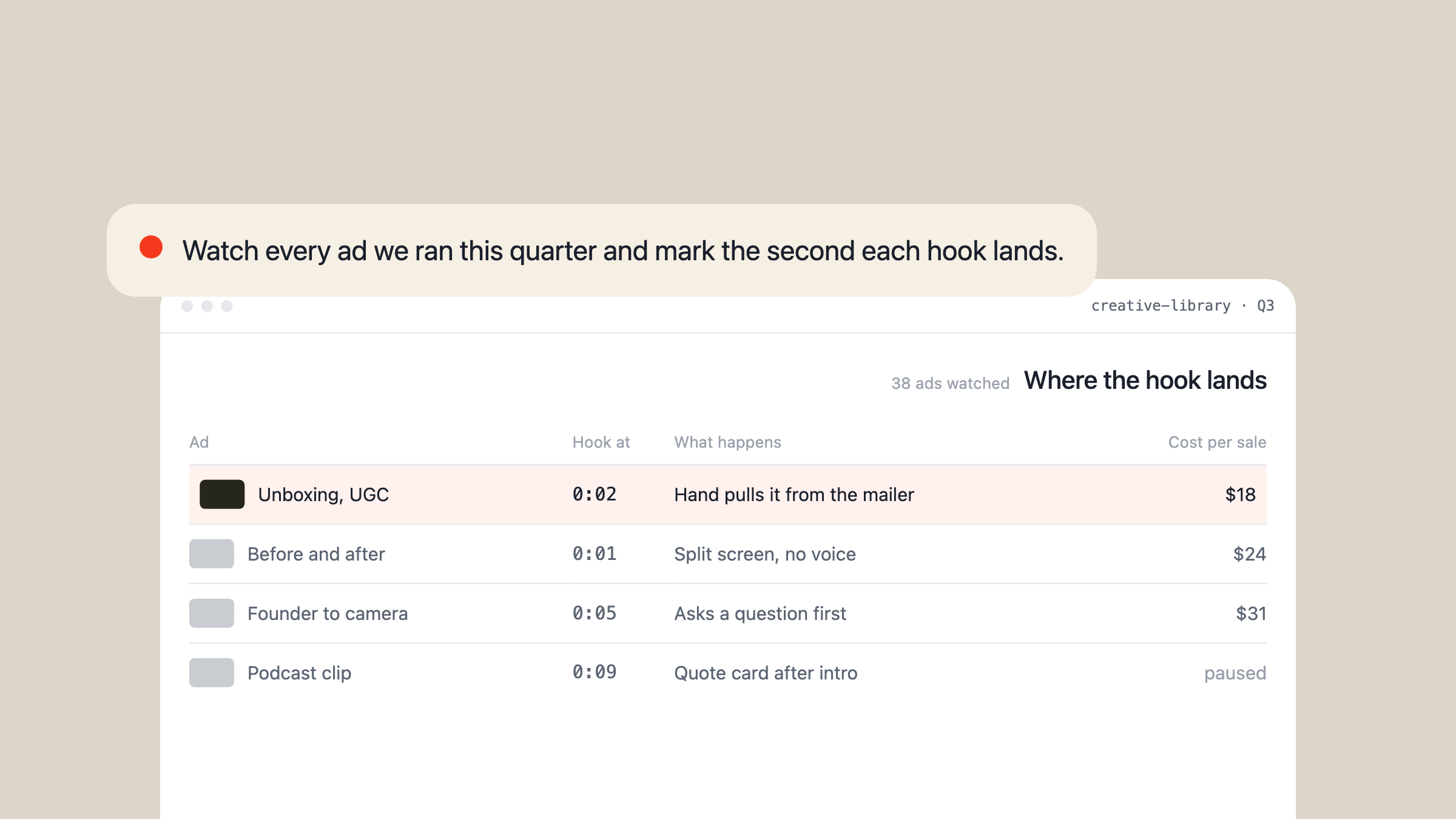
What changed in AI video analysis in September
Until this month, most AI video analysis worked like a very fast intern with a stopwatch. It took one frame every second plus the soundtrack, loaded all of it, and summarised what it had. That's fine for a 30-second clip. On a two-hour recording, it means paying for thousands of frames to answer a question about ten seconds of footage. People search for this under several names: AI video analysis, AI video analyzer, video analysis AI.
Two releases changed that. On 1 September Google added agentic video understanding to the Gemini API. The model reads your question first, then moves through the timeline and pulls frames, audio or transcript only where it needs them. The next day Gemini 3.8 Flash became generally available. Google's documentation puts the agentic mode at up to 88% fewer tokens and about 7% higher quality on long-form content, and still recommends the older fixed-rate mode for short clips.
P.K. Sharma, who writes about AI governance, compares the new mode to an investigator scrubbing a timeline: read the question, search, pick the promising windows, replay those in detail. That's the shift. The model decides where to look.
When watching gets cheap, the footage a business already has becomes something it can search. Ad libraries, sales calls, training courses, raw shoots, screen recordings. Most of it was recorded and never watched again, because nobody had the hours.
Why a transcript was never enough
The old workaround was to pull the transcript and ask a chat model about it. It gets you the words and nothing else.
Mike Futia, who builds creative research tools for ad teams, put the gap plainly: a transcript tells you what the creator said, video analysis tells you how they hooked you visually. Futia's example turned "she talks about makeup quality" into a note about premium packaging sitting next to a product demo that fails. No transcript contains that.
Sound is the other half. Udi Wertheimer wrote that Gemini follows motion, progression, dialogue and music, while models that screenshot once a second and transcribe the voice can't match what you hear to what you see. That's why, in Wertheimer's account, those models miss things like objects clipping through each other in a game, and Gemini catches them.
Rohan Paliwal, who runs direct-to-consumer ads, described the change a day after 3.8 Flash shipped. The earlier system read scripts to iterate. Now, Paliwal wrote, you can finally decode the videos: within three hours Gemini had gone through every ad in the account and compared each one against its performance.
One report cuts the other way. Furkan Gözükara said testing suggested 3.8 Flash receives audio as a transcription rather than natively, and asked Google to confirm. It's unresolved. If sound matters to your use, test it on your own files.
What people are already doing with it
Two weeks in, the hands-on reports cluster in a few places.
- Decoding a whole ad account. Paliwal has Gemini read every ad and point out where the team could improve. The team now publishes more ads recombined from creator footage than original shoots, and Paliwal says those perform better.
- Editing raw footage. A content creator known as cami once needed a team of three editors. Pairing a chat model with Gemini's agentic video mode now turns raw footage into an upload-ready, on-brand cut, and cami says a recent video went out with no manual edits at all. Efrain Torres built an editing tool on the same capability and called the results amazing.
- Breaking down a competitor's ad. The ad buyer who writes as 0x ROAS uploads a winning ad to Google AI Studio and asks for a scene by scene reconstruction blueprint. More on that below.
- Small internal tools. A builder named Victor made a private app in AI Studio that takes a video and returns a beat by beat breakdown, the story structure, a style book and the colour grade, as a document other tools can use.
- Sound that isn't speech. One home cook has Gemini judge the sizzle of frying and says it gets it near perfect.
- Research when text runs out. Harshith, a developer, watched a coding agent on 3.8 Flash fail to find enough written information about a car and go watch videos about it instead.
Long recordings are the obvious next category: meetings, support calls, safety footage. Sharma's example is a 90-minute safety tape and the question of when a machine guard was removed. Independent reports on that kind of work are still thin.
How to run a breakdown on one video
The quickest start is the workflow 0x ROAS published for ads. It needs one browser tab.
| Step | What you do | Where it stops |
|---|---|---|
| 1 | Open Google AI Studio | Some chats with video fail to reopen |
| 2 | Pick a current Flash model, thinking on high | Model names change often |
| 3 | Upload the video | Short clips suit the static mode |
| 4 | Paste the breakdown prompt | It describes, it doesn't rank |
The prompt casts the model as a direct response analyst and asks for five things:
- A verbatim transcript with timestamps.
- A scene by scene visual breakdown synced to that transcript: framing, lighting, props, captions, cuts.
- How every line is delivered, down to which words get stressed.
- The creative style of each scene, such as talking head, demo or screen recording.
- An inventory of every element in the ad.
The answer is capped at 5,000 characters, which forces density over padding. On-screen text gets missed more often than dialogue, so ask for it word for word as its own item. For anything long, switch on agentic video. In the API it's a single processing setting on the video input, and Google's docs suggest streaming or background runs for long jobs so they don't time out.
Where it still fails
Better isn't the same as solved, and the early reports say so.
PaperEdits, a video editing tool, ran a small benchmark on 2 September with six synthetic 10-minute videos and the previous Flash model. The agentic mode caught 18 of 20 brief events against 15 for static, and made better edit decisions. The static mode was faster, cheaper on those short files and better at broad retrieval. The team's own verdict was that the result is mixed.
Other failures are more ordinary. A video creator who writes as CruxLog asked 3.8 Flash to adjust one scene and said it bloated the file with garbage. Taruma Sakti found that an AI Studio chat with agentic video switched on would no longer open. Paliwal, for all the enthusiasm, says Gemini decodes the ads well but the recommendations are still not there yet.
Sharma names the subtler risk. A model that decides where to look can also look in the wrong place, so "nothing happened" is the hardest answer to trust. Keep the timestamps and clips it inspected, or you've traded assurance for efficiency.
For ads there's a limit no model fixes. A competitor's video carries every pixel and none of the results. Oli Mabane, an ecommerce growth operator, points out that you can't see their cost per acquisition or whether the ad was switched off after a few days. Copying the breakdown one to one copies the surface. The angle you can prove from your own account is worth more, which is the argument of our look at AI advertising examples.
Turn the footage you already have into a library
Futia described the problem with doing this by hand: by the tenth video you can't remember what made the first one land. The model fixes the watching. It doesn't fix the forgetting unless the output goes somewhere you'll query again.
The teams getting the most from it keep the breakdowns next to the numbers:
- One row per video, named by ad or recording ID, so an analysis can be matched to its results later.
- The timestamps it cited, so anyone can jump to the moment and check the claim.
- The outcome beside it: spend and cost per result for an ad, the result of a call, the fix a bug report led to.
- One question asked across all of it, on a schedule. Which openings keep showing up in the ads that lasted?
Two cautions before recordings of people go in. Sharma's point is that cheap search invites more surveillance, so set retention, access and purpose rules first. And when the operator Alex Cooper described recreating other people's viral hooks, the owner of a UGC agency replied that they'd sue if it were their video. Get permission for anyone's face, voice or footage.
That library is an internal tool, and it's the kind we build: a record of every video, what the model saw and what happened next, with the ad accounts connected so the numbers arrive on their own.